Length, voice, style and other settings
What each chip under the composer does, what is free, and how to save settings you use for every video.
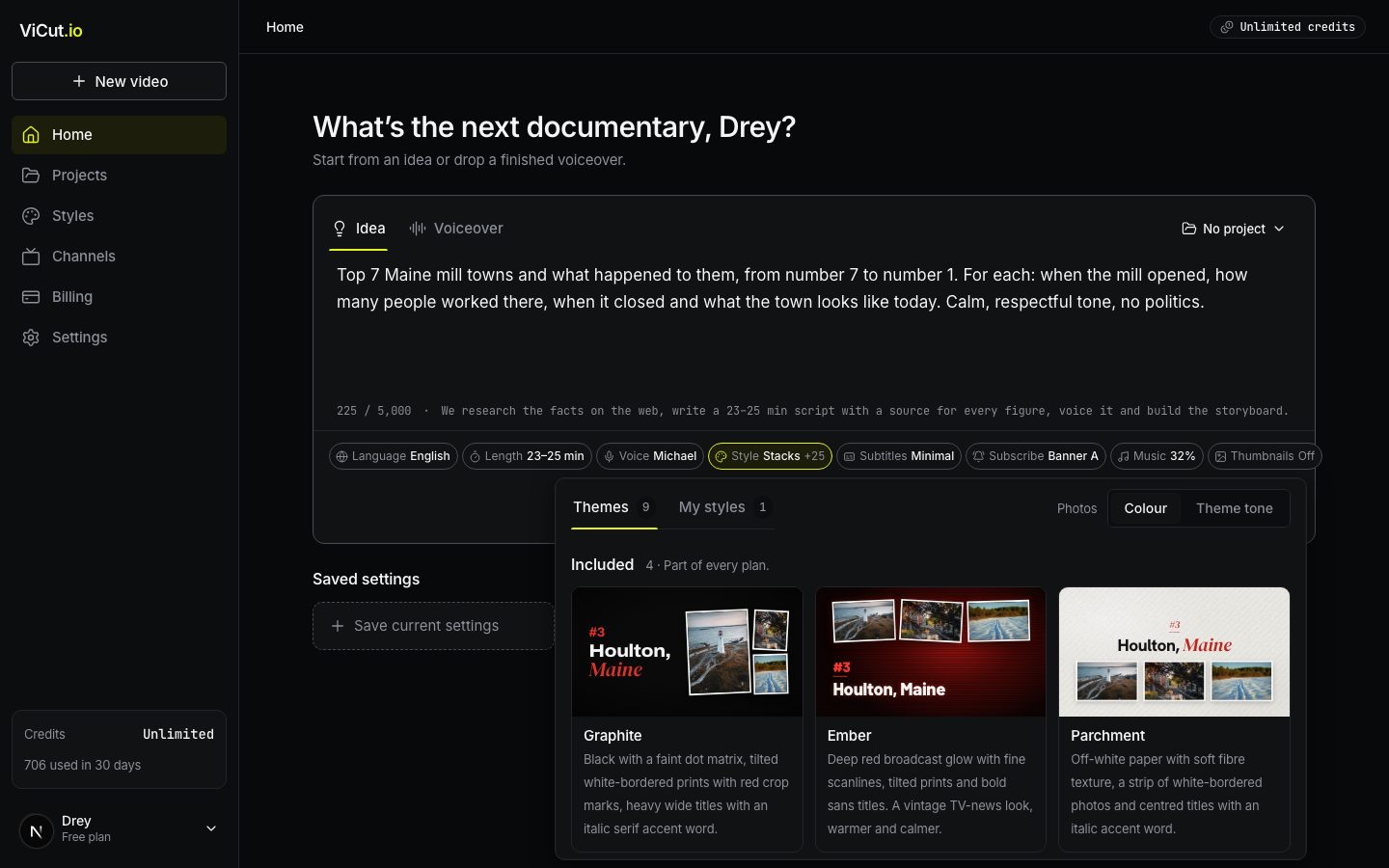
Under the text box on Home there is a row of chips. Each one opens a small panel. The composer remembers your last choices for the next video.
Project
The menu in the top right corner of the composer puts the video into a project. Choosing a project also switches the subscribe banner to that project’s channel. No project keeps the video in Videos without a project. See Projects and channels.
Language
English, Español or Deutsch. In Idea mode it sets the language of the research, script, voice, subtitles and on-screen text. With your own voiceover it is Auto by default: ViCut hears the language. More languages are coming.
Length
Idea mode only. Ranges from 8–10 to 33–35 minutes, each with its approximate cost. With a voiceover the length comes from the file and the chip shows Auto.
Voice
Idea mode only: AI narrators of the chosen language, with samples and filters. See Start from an idea.
Style
The look of the video: fonts, colors, title cards, photo frames and camera motion.
- Included themes are part of every plan.
- Premium themes cost +1 credit per minute of video. They also add story graphics: animated charts, quotes, key phrases and year cards.
- My styles are your own customized themes.
- Photos: Colour / Theme tone. Keep photos in their own colors, or tint them to match the theme.
Hover a theme card to see it move. Press Customize on the selected theme to make your own version. See Themes and your own styles.
Subtitles
Burned-in subtitles in one of six looks: Clean, Boxed, Karaoke, Bold caps, Minimal, Typewriter. Free. Switch off Burn subtitles into the video if you only want the SRT file, which you always get.
Subscribe
A short animated banner with your channel’s avatar asking viewers to subscribe. Free.
- A · Subscribe + Like, B adds the bell, C is a compact corner badge, D is a lower-third card.
- Channel sets whose name and avatar are shown. No channel yet? Add one in Channels.
- It appears twice by default: after the intro and in the middle of longer videos. Move it, add more or switch the look on the storyboard timeline.
Music
Background music under the voice, picked to fit the mood of your story. It lowers itself automatically while you speak. Set the Volume (32% by default) or switch it off. You can listen to it and change the track on the storyboard. Free.
Web photos
On by default. ViCut searches news and reference pages for the people, places, companies and events your script names and uses photos whose captions name them — a suspect, a victim, a founder, a building. These photos are not licensed to you: they belong to their sites and photographers, and a site can file a copyright claim against your channel. Each one is flagged on the storyboard so you can replace it with a licensed photo or keep it at your own risk, and the page it came from goes into Copy credits. A credit line does not give you the right to use a photo. Switch it off to use only licensed stock and archive footage. Free.
Thumbnails
Three 1280×720 YouTube thumbnails from the best real photos in your video, with a bold headline from your script. Made after the render. Free.
You can also make them later on the video page. See Thumbnails and YouTube details.
Saved settings
Below the composer, Save current settings stores the mode, length, voice, style, subtitles, banner and thumbnails under a name. Click a saved card to apply it. Manage renames or deletes them. Videos already made with those settings don’t change.
The cost line
Next to Generate you see the length, the credits and the preparation time. If you don’t have enough credits, the line turns red and the button becomes Top up credits.
Write to us — a person reads every message and replies by email.