Account, sign-in and settings
Signing in with a magic link, changing your email, appearance, stored videos, sessions, data export and deleting your account.
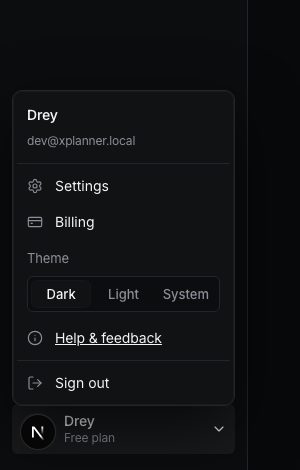
Open Settings in the sidebar, or click your name at the bottom of the sidebar.
Signing in
ViCut has no passwords. Enter your email, press Send magic link and open the link we send. It works for 15 minutes and only once. You stay signed in on that device for 30 days.
Profile
- Name: saved when you click away.
- Email: press Change email, enter the new address and open the link we send there. Until then you sign in with the old email. Once you confirm, we sign out your other devices and send a notice to the old address.
- Appearance: Dark, Light or System (follows your computer). Also in the account menu under Theme.
- Time format and Dates: how times and dates are shown.
Storage
Storage lists your finished videos with their render date, the date they are deleted, their size and a download button. Videos deleted within 7 days are highlighted.
Your uploads shows how much space your voiceovers and your own frames take and how much your plan allows: 2 GB on Starter, 10 GB on Creator, 30 GB on Studio. When it’s full, new uploads are refused and nothing is deleted. Delete videos you no longer need or upgrade. Uploads of a video that was cleaned up after 14 days without activity no longer count.
Security
Security shows every device signed in to your account. Sign out ends one session; Sign out everywhere else ends all but this one. Use it if you signed in on a computer that isn’t yours.
Privacy
- Download export: a ZIP with your account data. Videos are not included; download them separately.
- Delete your account: removes projects, videos, styles and channels. Your plan is cancelled right away, so you won’t be charged again; unused credits are not refunded. Type your email to confirm.
Sign out
Click your name at the bottom of the sidebar and press Sign out.
Write to us — a person reads every message and replies by email.